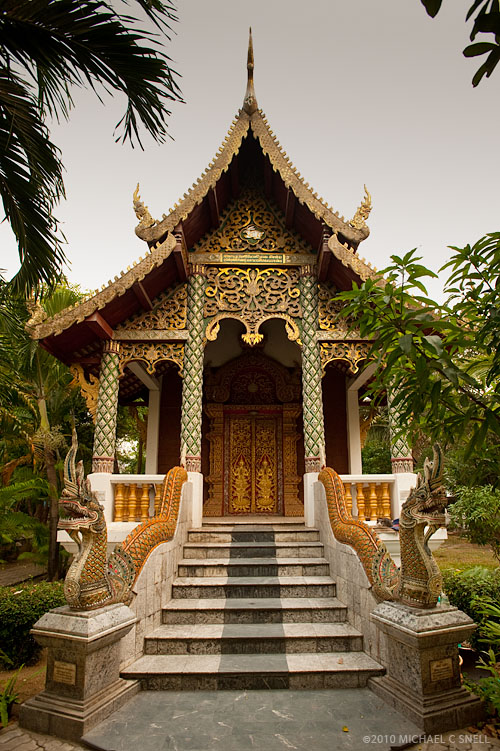
I’ve been meaning to write this post for a long time. While finishing up the keywording of my Thailand files in the last couple of weeks, I ran across a good example of what I’ve been wanting to discuss, and that is: how I use Google Maps to help me identify my images.
Of course, taking notes on site is always the best practice. I carry a small notebook in my camera bag but, in truth, I tend to take most of my notes with the camera itself. Here’s an example: on my last day in Chiang Mai, I had a few hours in the morning to stroll the old city on my own and photograph the various Wats, Chedis and Prayer Halls. I had heard that Chiang Mai has over 1000 Wats so, suffice it to say, it’s important to keep track of which is which when it comes time to keyword and label for my stock agencies.
I set out from the hotel before dawn and headed for the original, walled city. Once inside the walls, I would pass a small temple complex nearly every half a block. While I had been driven through these streets regularly for three days, I never would have seen many of these buildings without being on foot. They are tucked away and need to be sought out.
When I would begin to shoot a temple site, I would first look for a sign with the name in english and photograph that first. This is my way of taking notes. The images can always be sorted by capture time and I’ll have an “opening title” for each location I visited. Hopefully it will even be spelled correctly, but, you never know.
When I arrived at the Wat at the top of this post, I couldn’t find a sign in english anywhere. Nor was there anyone around that could tell me what it was save for a group of monks (who I opted not to bother), chanting inside this main building:
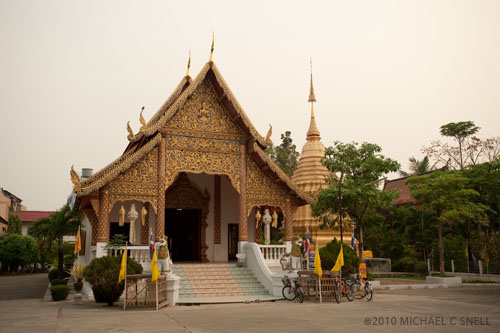
The site was a monastery comprised of a viharn (the building in the foreground), a chedi (the gold spire behind it) and a ubosot (the roof seen peeking over the trees in the back on the right). The english terms for these might be an assembly hall, a reliquary, and a prayer room or ordination hall. The ubosot, or prayer room, is what is pictured in the opening photo.
As it turned out, I never had the opportunity to speak with my local guide again and I continued on my way to Bangkok. Once back in the office at home, I could have tried to contact him by email but decided to do some detective work on my own first. This is where Google Maps comes in.
I knew the route that I had walked through the walled city, and I knew from signage, what the names were of the Wats on either side were. I zoomed in close in this area with Google Maps and switched to the satellite image view. There was my Wat:
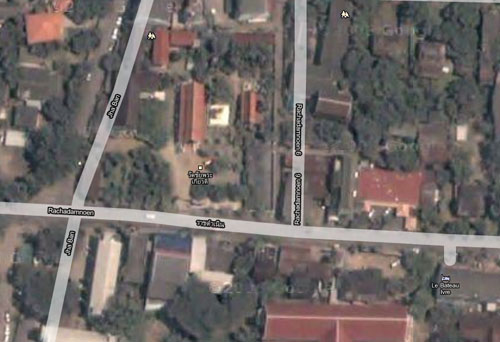
You can see the shiny gold chedi in between the two red-roofed buildings just above and to the left of center in this screen capture. There is a label, but it’s in Thai. I tried using an online translator but didn’t trust it so I tried using Google’s street level viewer in Google Maps. That’s the tool shaped like a little man. While the area had not been mapped for street level views, the tool did show several blue dots for the positions of still images that were on file for the site. Sure enough, by looking at some of these images, I was able to confirm that this was the Wat I was looking for and that it was named Wat Chai Phra Kiat, or Monastery of the Renowned Victory.
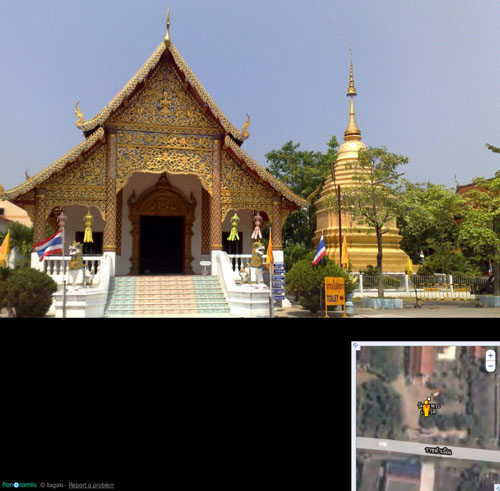
That’s the image that convinced me. Still, just to be safe, I Googled the name and found several other sites that confirmed it was what I was looking for and provided me with some alternate spellings.
The internet has been one of my most valuable tools for researching images and compiling keywords. I would hate to imagine the time it would take to track sites like this down through books, emails to local guides, etc. I still do my best to identify sites while I’m on location — there’s no substitute for that — but at least in situations like this, I can feel confident that I can come up with the information later when necessary.