One of my first impressions of Lightroom when I started working with it in version 1, was that I thought the interface was beautiful. I liked the darkness and how it could disappear into the background and let your photos take the spotlight. Sure, there’s always room for improvement, but it was a breath of fresh air from the expected, light grey, Adobe-style interfaces that came before and it was much, much more successful than the over-the-top experimental interfaces that have popped up from time to time (anyone remember Kai’s Photo Soap or Power Goo?).
One thing bugged me, though. I didn’t like the way the panels would stack up when toggled open causing you to have to endlessly scroll up and down to get to the various functions. Then I found out about Solo Mode and it changed everything. With Solo Mode turned on, only one panel is open at a time. The previous panel collapses when you open a new one. A small thing, but it was probably one of the more significant factors in winning me over to the Lightroom workflow. Previously Bridges tabbed-panel system had been more comfortable for me. Clicking a tab moved it forward, hiding the previous panel behind. Bridge was in Solo Mode all along.
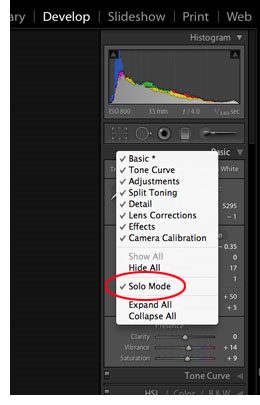 When I switched to my new Mac last month and installed Lightroom 3, I did a clean install and didn’t install over Lightroom 2. Therefore, my preferences weren’t picked up. No biggie, I wanted a clean start, but I couldn’t for the life of me find how to turn on Solo Mode again. After some googling, I found the answer. For some reason Solo Mode is not made obvious in any of the main, top menus — instead, you have to control-click (I assume right-click on a PC) on one of the panel headers to get the pop-up menu. There you can select which panels are visible, or — hallelujah — turn on Solo Mode. Someone correct me if I’m wrong, but I think this is the only way to get to this feature.
Like I said, it’s a small thing but it makes all the difference for me in my workflow to only have the one panel open at a time. Sure, I have to click the header of the panel that I want to use next to open it, but for me it’s significantly quicker than scrolling through a bunch of open panels.
Note to Adobe: can’t you put Solo Mode under the Windows > Screen Mode menu? That would make sense to me.